Archiv der Kategorie: English
The Grappler
Outsmarting the Giant Hornets
How to catch Japanese Giant Hornets:
Appointment with Disaster
Now show me a video like this for allegedly mankind-threatening AI.
Protection Against Radiation In Uranium Mines
Why Bitcoin Is A Scam
How Bank Robberies Work
Classic bank robbery has fallen out of fashion in this age of digital payment and fintech. Nevertheless, it is quite interesting to hear how crime actualy works as opposed to how people are imagining it. As in all work, attention to detail maters.
How To End Ransomware
Lisa Forte has a proposal how to end the ransomware pandemic, and it is a good one: Stop ransom payments. After all the perpetrators are doing it for the money, so their attacks become pointless if they won’t make any. This sounds simple but is often forgotten in favor of blaming the victims. Security is a common good.
A (Trolley Problem) Trolley Problem
Algorithm ethics as a trolley problem:
There is a runaway trolley barrelling down the railway tracks. Ahead, on the tracks, there is a trolley problem waiting. The trolley is headed straight for it, burdening you with an ethical dilemma to decide:
[There is a runaway trolley barrelling down the railway tracks. Ahead, on the tracks, there are five people tied up and unable to move. The trolley is headed straight for them. You are standing some distance off in the train yard, next to a lever. If you pull this lever, the trolley will switch to a different set of tracks. However, you notice that there is one person on the side track. You have two options: (1) Do nothing and allow the trolley to kill the five people on the main track. (2) Pull the lever, diverting the trolley onto the side track where it will kill one person. What is the right thing to do?]
You are standing some distance off in the train yard, next to a lever. If you pull this lever, the trolley will switch to a different set of tracks. However, you notice that there is an equivalent trolley problem on the side track. This other trolley probem will be decided not by you, it will be decided by an algorithm.
You have two options:
- Do nothing and allow the trolley to make you the sad hero of a trolley problem.
- Pull the lever, diverting the trolley onto the side track where an algorithm will take care of the problem job for you.
What is the right thing to do?
(Trolley problem description based on Wikipedia. Reductio ad absurdum inspired by this tweet.)
Attack Scenario ≠ Threat
The below video gives an example of what some people would call a threat model. For all I can tell the video leaves out some detail but is otherwise accurate. Why does it appear hilarious or silly rather than reasonable?
As a joke the video exploits a mismatch between the sensible, even verifiable analysis it presents and the ridiculous assumptions it implies. If this attack scenario manifested itself it would play out pretty much as presented. However, the implied very narrow and specific mode of operation – firing cannon rounds at computers – does not correspond with the behavior of any reasonably imaginable threat agent. Any agent with the capability to deploy main battle tanks is facing a wide range of possible uses and targets. Shooting individual personal computers remains not only far from being one of the more profitable applications of this capability, but guarantees a negative return. The cost is high and destruction of specific, low-value items promises rather limited gains. There are also much cheaper methods to effect any desired condition on the specific type of target, including its complete destruction.
While the attack scenario is accurate, it lacks, therefore, a corresponding threat that would produce actual attacks. Such a threat would exist, for example, if the assumed target were other main battle tanks rather than personal computers.
Shake Hands With Danger
New to cycling?
Are you new to cycling or taking it up again after a pause? GCN has some advice for you. All of this should be common sense but is apparently not:
5 Essential Skills Every Cyclist Should Learn
How To Ride In A City | Bike Riding Tips For Busy And Urban Streets
Bicycling Safely On The Road
Vehicular cycling advocate, John Forrester, recently passed away. The video below illustrates his ideas. In a nutshell, as a cyclist you should take yourself seriously as a road user, confidently claim the same right to the road as anybody else, and behave mostly as you would driving a motor vehicle. I have only one nit to pick: the cyclists in the video seem rather shy when it comes to claiming space, they could take the middle of the lane more often.
According to my experience, Forrester’s ideas work very well although they may take some getting used to before one can really appreciate them. Against general inclusionist trends in western societies, modern-day cycling infrastructure advocates nevertheless reject his approach, arguing that roads – or rather, segregated bike paths – should be designed for cyclists instead. In a rhetorical sleight of hand they gain approval to the truism that infrastructure design influence the safety and happiness of cyclists only to switch the general notion of infrastructure for their narrow definition later.
Dense or fast traffic can feel scary, but the real danger often looms where we least expect it. A crossroads in the middle of nowhere can be dangerous due to the angle in which roads meet. This is an infrastructure issue to be fixed by redesigning the crossroads for better visibility and perceptibility. Being advocates for a particular design, segregationists rarely discuss bicycle-friendly road design – or design objectives and tradeoffs at all.
Vehicular cycling works better on some roads than it does on others. It works where other road users do not perceive cyclists as an obstacle, either because there is ample space to pass or traffic is running so slow that passing does not really make a difference. Vehicular cycling becomes psychologically much harder for everyone when road design turns cyclists on the road into a seemingly unnecessary obstacle and therefore, a provocation. Durch designs with narrow lanes on the regular road and separate bike paths do a great job at that. Vehicular cycling would be virtually impossible here:
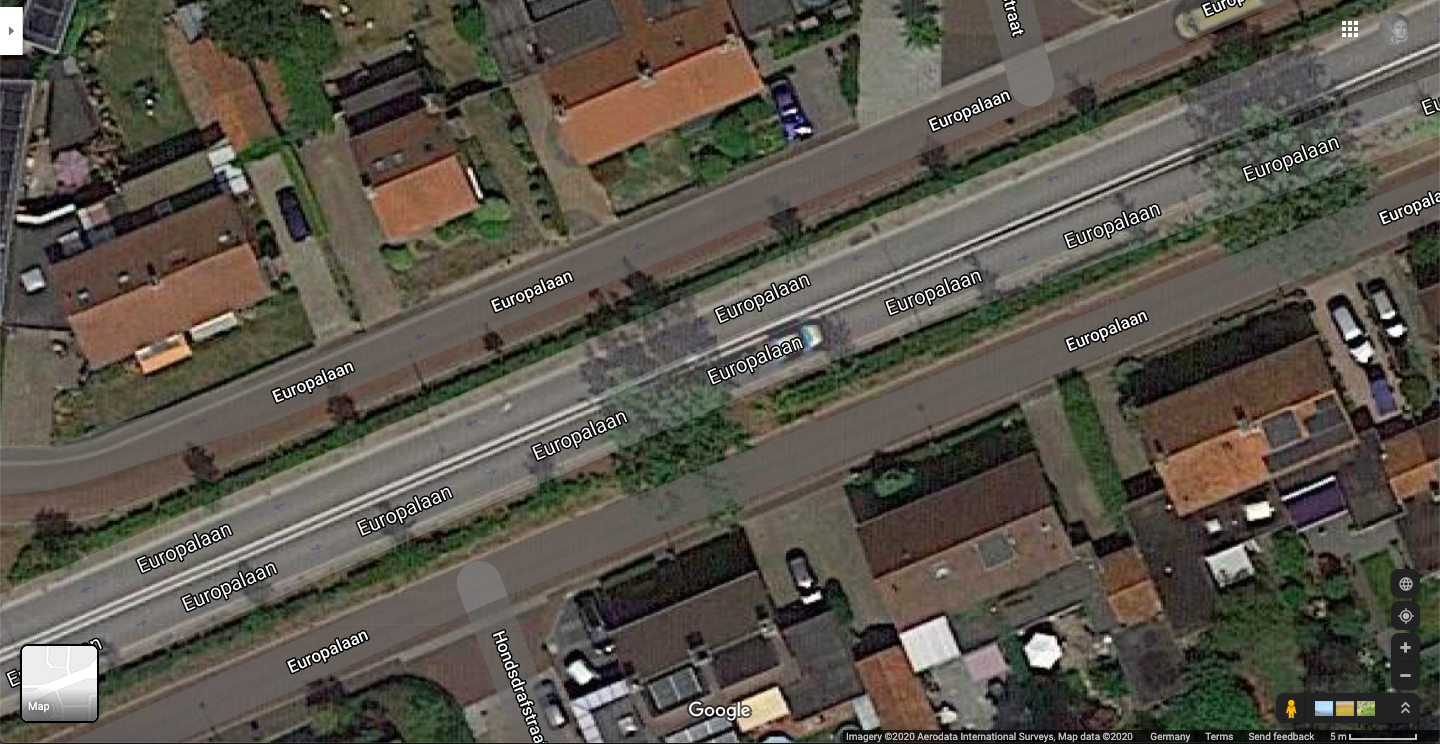
This road design causes the very stress bike path advocates promise to relieve through segregation. Unless you give up and comply, that is. Any honest debate of cycling infrastructure should at least acknowledge that regular roads are infrastructure and segregation is not the only viable approach to infrastructure design for cycling. If someone tries to sell you bike paths while avoiding a more comprehensive discussion of infrastructure design for cyclists, just walk ride away.
Wearing Your Mask, Chernobyl-Style
More and more people are wearing masks as personal protective equipment to lower the risk of coronavirus infection. Together with the growing of lockdown hair and beards while hairdresser and barber shops remain closed, this trend poses a bit of a fashion challenge. How can you wear a mask and still look great? In case you need some inspiration, the Chernobyl liquidators in the following video demonstrate smart ways of wearing a mask around the smoldering ruins of a nuclear reactor.
Privacy by Design or Poor Requirements Engineering?
Privacy – or security or any other desirable, ethereal property – by design sounds like a great thing to do. Alas, design is complicated and hard to guide or control as a process. One common misunderstanding has become obvious in current efforts to develop and deploy contact tracing technology contributing to epidemic control. Some of these efforts such as DP^3T, TCN, or Apple’s & Google’s announcement promote privacy to the top of their list of objectives and requirements. This is wrong. It would be appropriate in an R&D project developing experimental technology, but contact tracing is an actual, real-world application and must fulfill real-world requirements. Premature optimization for technical privacy protection does not help its cause.
First and foremost, an application needs to support a basic set of use cases and provide the necessary functions in such a way that the overall approach makes sense as a solution of the given problem(s). For contact tracing, essential use cases include:
- contact identification,
- contact listing, and
- contact follow-up.
In addition, any large-scale application of contract tracing needs to support:
- safeguards against abuse, and
- monitoring and governance.
Each use case entails requirements. Contact identification must be sufficiently reliable and comprehensive; it must also take place quickly after an infection has been detected. Contact listing needs some form of risk assessment, a method to notify contacts, and a way to justify mandatory quarantine requests. Contact follow-up needs some idea how and when to interact with listed contacts. Underlying the whole design must be some conception of which contacts matter, what an identified contact implies, what to do with or require from identified contact persons, and what to achieve through contact tracing. There needs to be some definition of success and failure for the system and individual cases, and some monitoring of how well the system operates. One also has to think about possible abuses and misuses of the system such as evasion, manipulation, or exploitation, and find ways to prevent them or to deal with them when they occur.
Such questions are to be answered in the high-level design of a contact tracing system. They can and should be pondered at the level of paper prototypes, forcing developers to get specific but allowing quick modification and user testing. Technology has to be considered at this point primarily as a constraint: What is realistically possible or available and would the design be feasible to implement? However, some fundamental design decisions have to be made at this level after evaluating alternatives, for example, which parts of the system to automate and which ones to leave to humans, or which technologies, platforms, and devices to consider and use.
Like any design process, this high-level system design may take any number of iterations before converging toward something that might work when implemented. New questions will likely come up in the process. If, for example, the system is to leave tracing to humans, how much time can they spend per case, how many of them will be needed, how will they work, and which types of data and support would really help them?
Secondary requirements like performance or privacy can and should already be considered at this stage. Privacy by design means just that, to consider privacy protection as dimensions of the design spaces from the beginning on. However, privacy is a dependent design dimension and like all other requirements it is subject to trade-offs. Dependent means that any design decision can affect the privacy properties of a system. One cannot delegate privacy to a system component or function that would take care of it comprehensively regardless of the design of any other aspect of the system. Trade-offs occur when once has to choose between design alternatives; each option will likely have some advantages over the others but also some disadvantages, so that one has to compromise and keep a balance.
Misunderstanding privacy by design as privacy technology über alles, demonstrated by current proposals for privacy-preserving contact tracing, is a recipe for disaster. Starting with perfect technical privacy protection as the primary requirement constitutes a premature optimization that de-prioritizes all other requirements and design dimensions, delays important design decisions while arbitrarily constraining them without impact assessment, and prevents well-considered trade-offs from being made. The most likely result is a system that performs well at most in the privacy dimension, reflecting the priorities of its designers.
As a symptom, none of the proposals for privacy-preserving contact tracing has yet answered question like the following: How does it assure the reliability of the data it collects or produces? Which failure modes and error rates does it produce? How is the system to be monitored for problems and abuses? In which institutional framework is it designed to operate? How does it distribute responsibilities between involved parties? How are outputs of the system to be interpreted and used in the real world, which consequences should they have and which ones are not desirable? How can its operation become transparent for its users? Should participation be mandatory or voluntary and how can the design be optimized for either case? If participation is mandatory, how would this be enforced, how can the system be made universally accessible for everyone, and how may people evade it? If voluntary, which incentives does the system create and which features let users trust or distrust the system? Such questions need to be discussed and addressed long before the technical minutiae of data protection.
Placing technical privacy protection in the center of attention can make sense in a research project, where one develops new technology to evaluate its properties and capabilities. The stakes are low in such a project, where the results are prototypes and research papers. Developing a real-world system, especially one to be used at the intended scale of contact tracing apps, requires a broader perspective and comprehensive requirements analysis.
P.S. (2020-04-18): Government Digital Services of Singapore with their TraceTogether app apparently got their requirements analysis and design process right:
One thing that sets TraceTogether apart from most private efforts to build a Bluetooth contact tracer, is that we have been working closely with the public health authorities from day 1. (…) The team has shadowed actual real-life contact tracers in order to empathise with their challenges.
P.S. (2020-04-19): The closest to a requirements document I have seen so far is this: Mobile applications to support contact tracing in the EU’s fight against COVID-19, Common EU Toolbox for Member States (via).
P.S. (2020-04-22): The Ada Lovelace Institute published a quick evidence review report titled: Exit through the App Store? A rapid evidence review on the technical considerations and societal implications of using technology to transition from the COVID-19 crisis, which makes a number of reasonable recommendations.
Car Security Forty Years Ago
Another video clip from Thames TV with a security theme, this time reporting on the insecurity of car locks and drivers’ failure to lock their cars in the first place:
Dot Con
In early March, 2000 the dot-com bubble of the late 1990s reached its peak and began to burst. The craze that had fueled this bubble was not entirely natural. Major investment banks used the opportunity to play the IPO game and were subsequently investigated by the SEC. The 2002 documentary, Dot Con, tells this part of the dot-com story:
SecSE2020 Workshop
There will be another International Workshop on Secure Software Engineering in DevOps and Agile Development (SecSE) this year. The upcoming edition is going to take place in Dublin in conjunction with the Cyber Security 2020 conference (June 15-17 2020). Please submit your papers until 6 February 2020 – three weeks to go! – and spead the word.
What Blockchain Really Is
Blockchain is not a technology, it is a meme. The legend of a magical technology about to disrupt everything – e-very-thing! – emerged from an ecosystem of investment fraud, where it was originally used to sell worthless coins and tokens to the gullible. The blockchain legend did not have to make sense to fulfill this purpose, quite to the contrary.
Due to media fascination with the speculative bubble formed by Bitcoin and other crypto-“currencies”, the blockchain legend spilled over into the real business world. It had everything it needed to spread: great promises instilling fear of missing out, explanations one could replicate by memorizing rather than understanding, and holes in just the right places that everyone could fill with their personal visions.
Application proposals, unsurprisingly, revolved around what people experienced in their everyday lives, such as tracking bananas from the farm to the supermarket or making payments. The blockchain legend would have worked just as well with any other alleged use case, as it did not promise any specific advantages compared to actual technology.
As a meme, the blockchain legend can spread only among those who want to believe, or at least accept the proposition that blockchain were a technology. The moment one understands the true nature of blockchain as a redundantly-decentrally spread meme one stops spreading the meme.
Two years have passed since peak blockchain. Fewer and fewer people continue to propagate the meme. I can see the light at the end of the tunnel.
Computer Crime in the Early 1980s
This clip from 1983 allows us a glimpse into the history of computer crime. Much of what is being said still sounds familar today, doesn’t it?
Stolen Bicycle / geklautes Fahrrad
Should anybody offer this bicycle for sale, please let me know. It is a 2018 model Bergamont Grandurance RD 5.0, frame size 61cm, frame number AB71241941. Condition mostly as sold, but with an added rear-view mirror at the left bar end, to bottle cages, and upgraded lights (head: Lumotec IQ-X, rear: Secula).
Falls Ihnen jemand dieses Fahrrad anbietet, sagen Sie mir bitte Bescheid. Es handelt sich um ein Bergamont Grandurance RD 5.0, Modell 2018, Rahmenhöhe 61cm, Rahmennummer AB71241941. Zustand fast wie gekauft, aber zusätzlich mit einem Rückspiegel am linken Lenkerende, zwei Flaschenhaltern und besserer Beleuchtung (vorne: Lumotec IQ-X, hinten: Secula).

Crew Resource Management
In this talk, Nickolas Means tells the story of United Airlines Flight 232, which on July 19, 1989 crash-landed in Sioux City after suffering a mid-air engine explosion and consequent loss of hydraulics. Although the crash killed more than a third of the passengers and crew, the fact that the aircraft made it to the airport at all and more than half of the occupants survived is widely attributed to extremely good airmanship and collaboration in the cockpit. Airlines teach their pilots how to work and cooperate effectively under stress and United 232 continues to be cited as a success story for this type of training.
 Sicher ist sicher?